Creating an owner’s manual is often underestimated. It sits at the intersection of engineering, product, and user experience, and when done right, it becomes a key part of how riders understand and trust a product.
For the BMC Kaius Generation 2, the objective was clear: deliver a manual that is technically accurate, visually intuitive, and aligned with the premium positioning of the bike.
Defining the Structure from a Product Perspective
The foundation of the manual started with structure.
Rather than relying on legacy formats, I built the framework from scratch based on my technical background and experience in product management. The goal was to mirror how a rider actually interacts with the bike, from first setup to advanced adjustments and maintenance.
This led to a clear, logical flow:
Introduction
Safety guidelines
Product overview
Adjustments and torque specs
Assembly steps including key systems (cockpit, drivetrain, braking, integration)
Maintenance guidelines
Each section was designed to reduce friction: short, focused, and action-oriented.
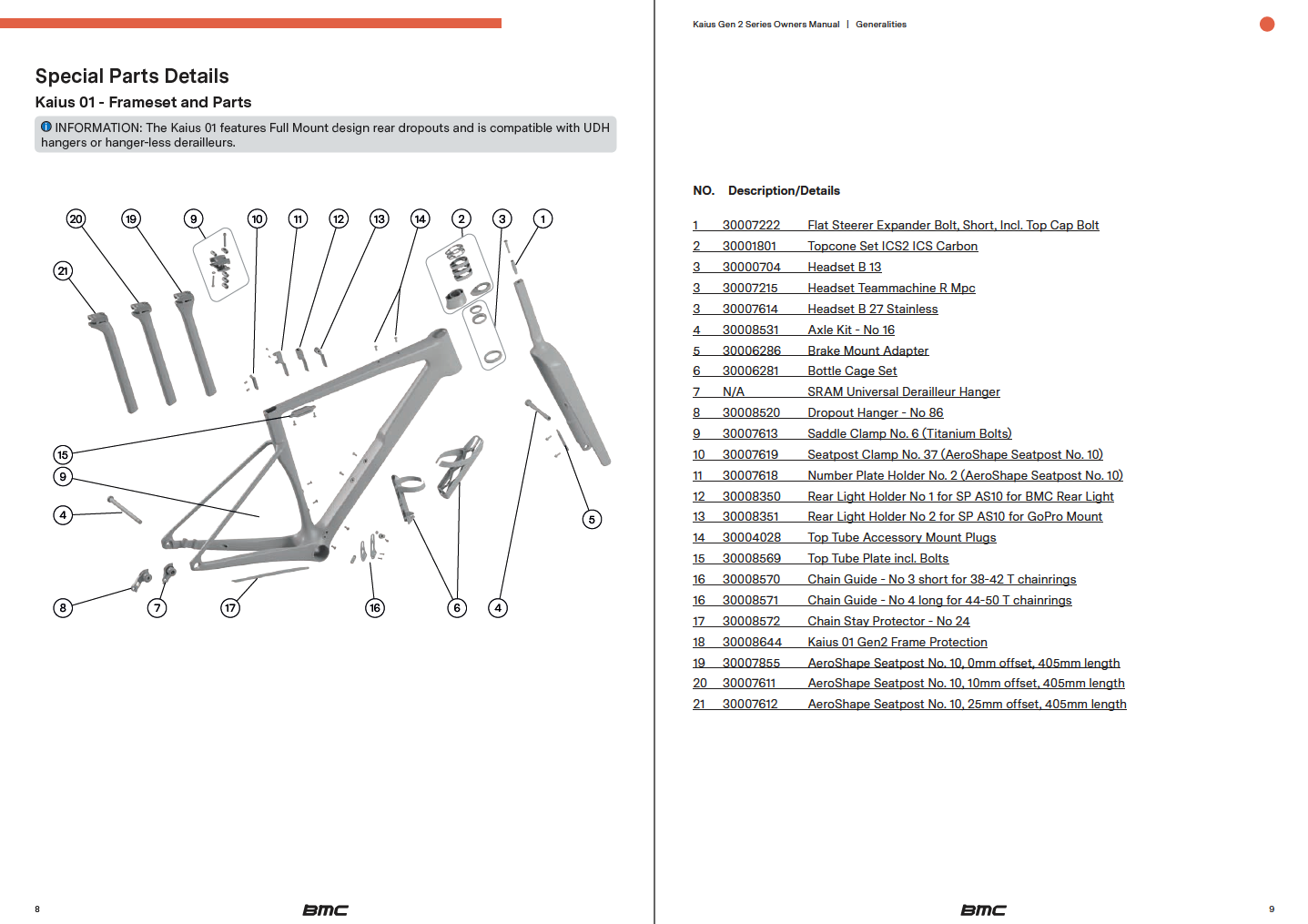
The famous exploded view with dynamic links to each component.
Writing the Copy: Precision Over Volume
The copy was developed with a simple principle: clarity beats completeness.
Instead of overloading the manual with information, the focus was on delivering the right information at the right moment. This meant:
Creating clear illustrations
Using concise, directive language
Avoiding unnecessary technical jargon where possible
At the same time, the technical depth remained intact—especially for key components and adjustments where precision matters.
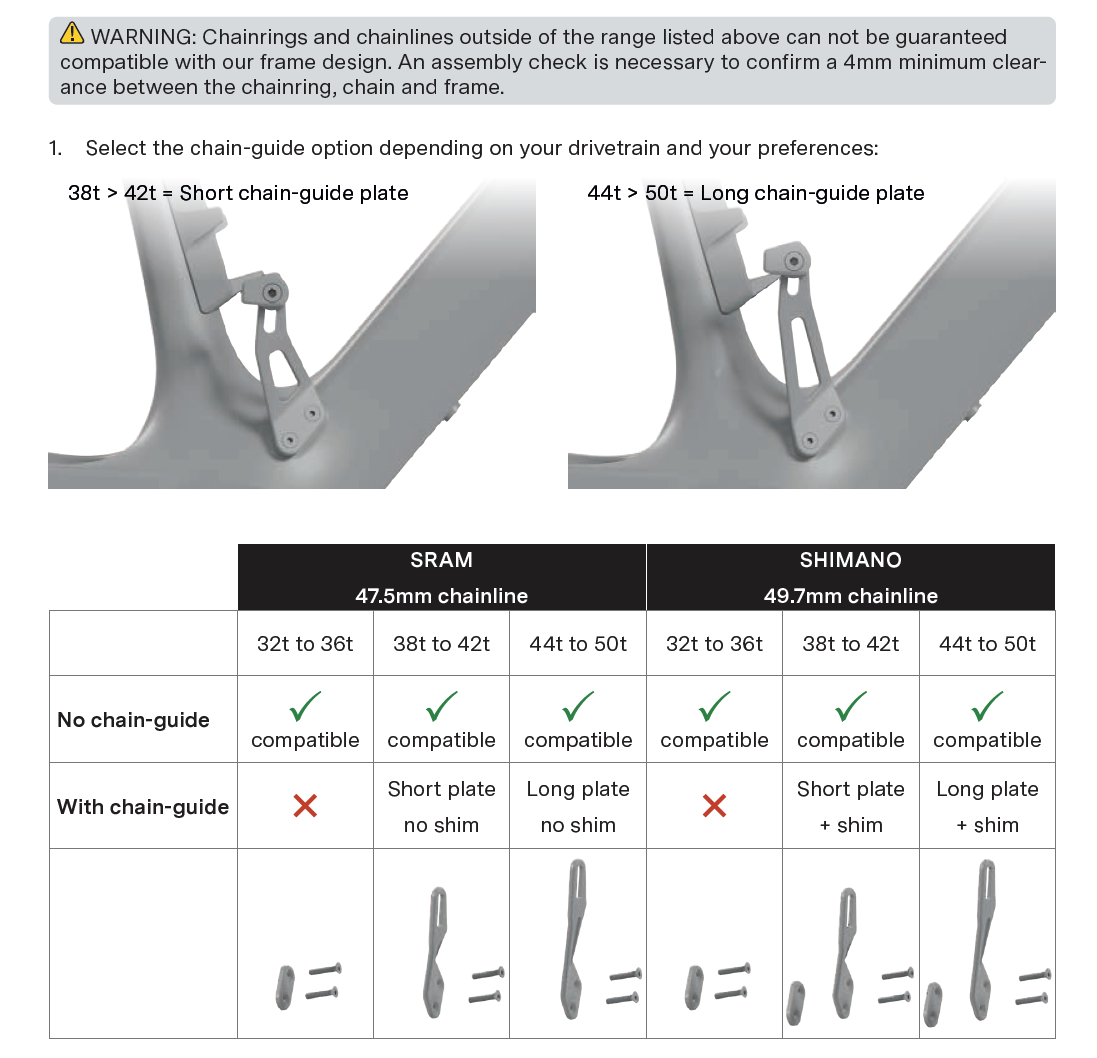
Chain guide section explaining the different configurations possible.
Creating Imagery with R&D 3D Data
A major step forward in this project was the use of 3D assets directly from R&D.
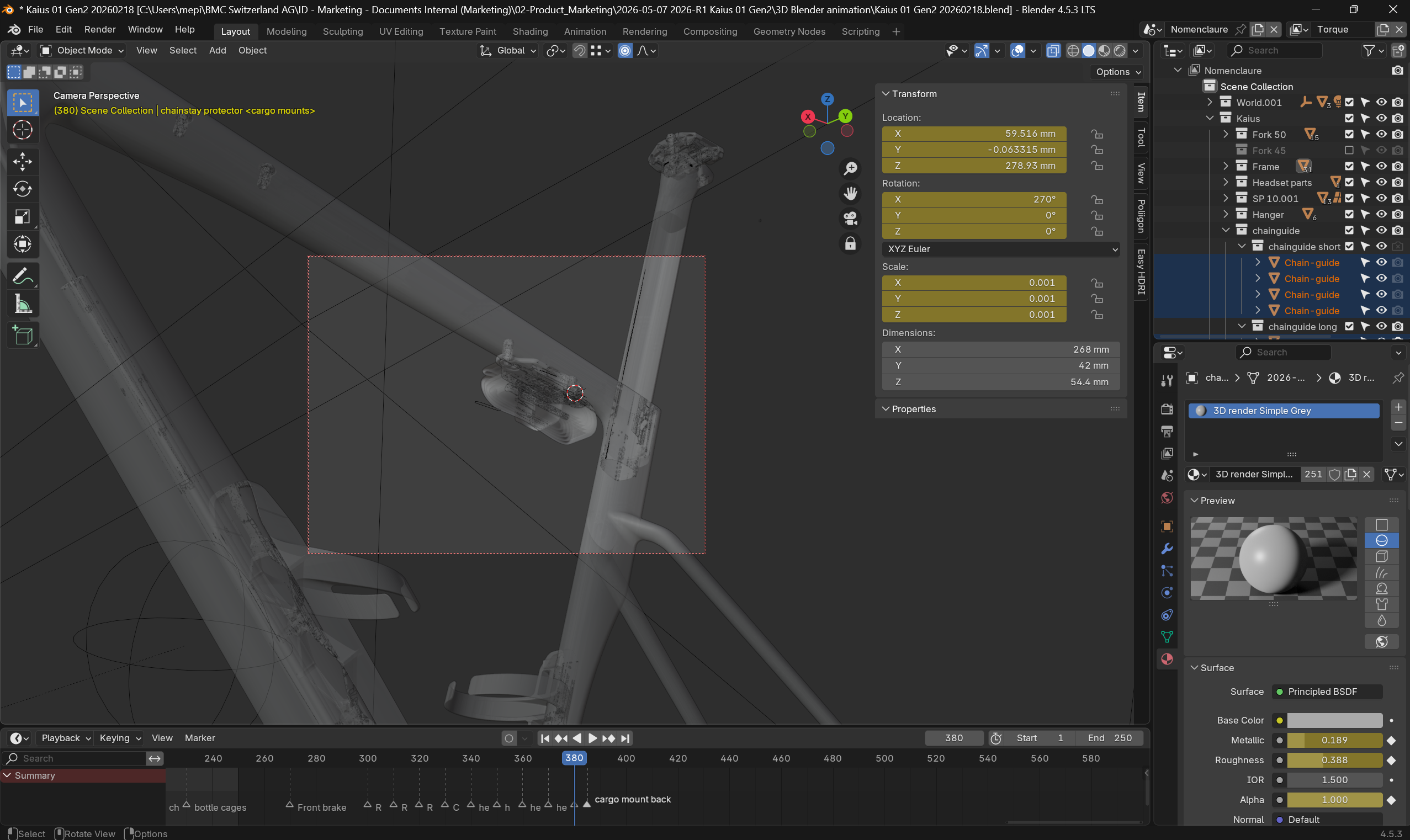
By leveraging native CAD data and rendering it in Blender, I was able to create:
Clean, distraction-free visuals
Perfectly accurate component representations
Consistent angles and lighting across all images
This approach solved a common issue with traditional manuals: photography limitations. Instead of dealing with physical prototypes, lighting constraints, or inconsistencies, the 3D workflow ensured full control and scalability.
It also allowed us to illustrate complex internal features and assemblies that would be difficult or impossible to capture with a camera.
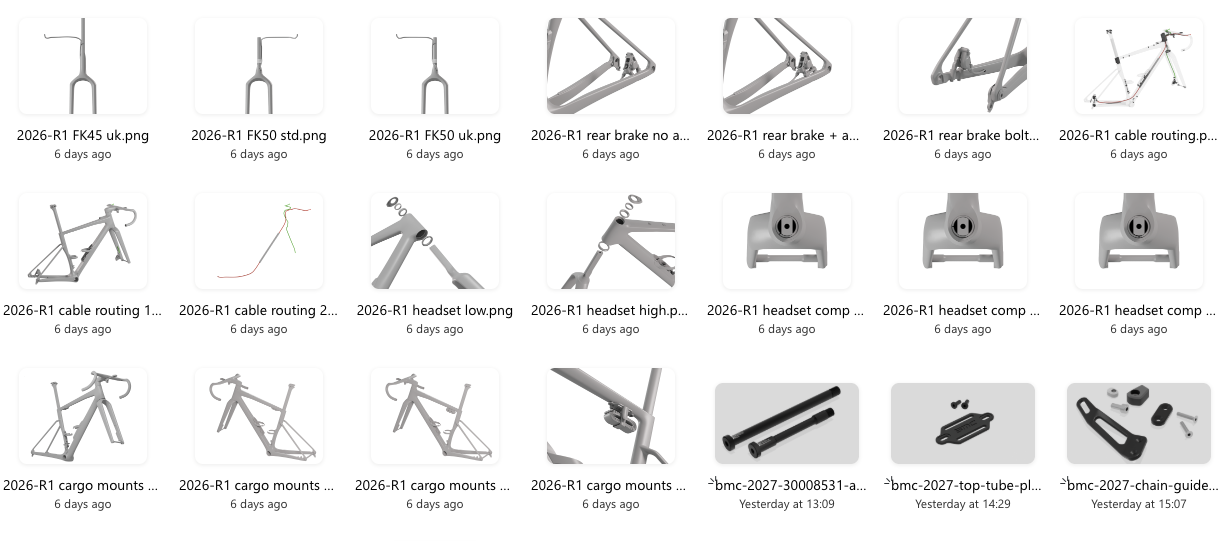
Some of the imagery prepared with Blender.
Cross-Functional Collaboration
While the structure and core content were driven autonomously, the manual was ultimately a collaborative effort.
Close coordination was required across multiple teams:
R&D for technical validation and 3D assets
Quality for compliance, safety checks, and accuracy
Product Management for product definition
Marketing for tone, branding, and visual alignment
The challenge was not just gathering input, but organizing it efficiently. Clear ownership and structured reviews were key to keeping the process moving and avoiding unnecessary iterations.
From Draft to Approval
The final phase focused on alignment and validation.
Each section went through targeted reviews with the relevant stakeholders, ensuring that:
Technical information was fully validated
Safety-critical instructions were clearly highlighted
Visuals matched the latest product specifications
The overall document remained consistent and coherent
The result is a manual that reflects the product itself: precise, refined, and built with intent.
Key Takeaways
A strong structure is the backbone of any effective manual
Clarity and usability should drive copywriting decisions
3D-based imagery significantly improves consistency and quality
Cross-functional collaboration is essential—but needs structure
Ownership and autonomy help maintain speed and coherence
This project is a good example of how technical documentation, when approached as a product in itself, can elevate the overall user experience.
Creating a user manual might seem like a daunting task, but with the right approach, it becomes a straightforward and essential part of product development. A good user manual serves as a comprehensive guide for Riders and Retailers, ensuring they can easily understand and use your product while minimizing the need for Customer Service support. In this article, I’ll walk you through the steps involved in creating a user manual, using the some of the latest BMC frame specific manuals as an example to illustrate key points.
Step 1: Understand the Product information ecosystem and Audience
The brand’s website, its product details, and the general bicycle owner’s manual are two of the most important sources of information available. They already compile answers to address the rider’s needs. The website covers user benefits and model specifications, while the general bicycle owner’s manual covers legal obligations. We do not want to repeat the content of these two sources in our detailed technical manual unless they provide additional technical insights that address the rider’s needs.
A technical manual is essential because it provides clear, detailed instructions on how to use, maintain, and troubleshoot a product, ensuring users can operate it safely and efficiently. It helps prevent misuse, reduces customer support needs, and improves the overall user experience. By offering step-by-step guidance, a technical manual empowers users to get the most out of the product, ultimately increasing satisfaction and reducing the likelihood of mistakes or damage.
Before you even start writing your manual, it’s crucial to understand the product inside and out. A deep understanding of the product helps you highlight important features, clarify common issues, and provide the correct instructions. So grab your toolbox and start exploring all the details of your product. Your experience will ultimately make the difference.
Step 2: Outline the Structure
A user manual typically follows a specific structure to ensure that users can find the information they need quickly. The approach I’ve chosen is to follow the assembly steps. This ensures a logical flow in every step and mostly prevents missing steps when assembling complexly designed products.
Cover Page
Product name and model, Brand logo. Don’t make it to laud or complexe. This document should be timeless and always be inline with your Brand’s corporate identity.
Table of Contents
Clearly list all sections of the manual, making it easy for users to navigate. When exported as a pdf or webpage, the table of content will help you to quickly jump to a section with a click on the chapter.
Introduction and Technical Specifications
A brief overview of the product, Intended use and target audience, Safety precautions or warnings. Repeating some of the key safety elements is useful. In some case, it’s exeptionaly repeating content already published on the website or General owner’s manual.
Assembly Instructions
Step-by-step instructions on how to assemble the product. Includes as many visual aids (diagrams, images). This includes adjusting settings, operating the product, and maintenance tasks.
Maintenance & Troubleshooting
Regular care tips and instructions on how to maintain the product.
Common issues and solutions (e.g., how to clean the bicycle, adjust brakes, etc.).
Warranty and Support
Provide warranty details and instructions for obtaining customer support if issues arise.
Step 3: Write Clear and Concise Instructions
One of the most important aspects of a user manual is clarity. Instructions should be simple and direct, especially when dealing with complex products.
For example, in most manuals I’ve created, the instructions are laid out step-by-step with images and diagrams that accompany the text. This makes the manual easy to follow and ensures that users don’t miss any crucial steps during assembly or setup.
Text is not ideal. It must be written in a chosen language, which can make it difficult to access if not translated into local languages. Try to stick to the point and minimize it. The ultimate goal is to create a mostly visual manual, similar to LEGO or IKEA instructions. However, this is particularly challenging for a bike manual.
This is even more true when highlighting critical notes. Warnings and information blocks must be clearly identified to warn riders about key details.
Avoid jargon unless necessary, and if you need to use technical terms, make sure to define them. The goal is to make the manual as user-friendly as possible, regardless of the reader’s technical background.
Step 4: Use Visuals to Support the Text
Visuals can make or break a user manual. Diagrams, images, and screenshots are invaluable for clarifying complex instructions.
Use high-quality images that are easy to interpret. You may also want to include icons or symbols to represent warnings, tips, and other critical notes, making it easier for users to spot important information at a glance.
Clear 3D illustrations are a must. This help to show on a flat surface (screen or paper) what the Rider sees. Design 3D softwares are enabeling a lot of possibilities to generate a clean document showing details without the background of a photo or the lack of details or perspective of a sketch.
On the top of 3D rendering, make sure you are adding clear icons or symbols and info to instruct the operation details. Arrows, info box and color highlights are a must. And talking about icons and colors, using a convention as universal as possible will facilitate the understanding for your Rider. Great conventions are already in use by SHIMANO and SRAM in their manuals. Do not copy but don’t go too far from what they have established.
Step 5: Test the Manual
Once the manual is written, it’s essential to test it. Testers are of many types.
Engineers: At the heart of each component design, the engineer will help verify if all parts are illustrated correctly and if all technical details are clearly defined and explained.
Quality Managers: With a strong focus on troubleshooting and extensive experience in customer service support, quality managers will definitely assist with legal and critical sections. In addition to content, they will often help integrate the document into the company’s document management system for future traceability.
Graphic Designers: A document is only valuable if it’s visually appealing and easy to read and understand. Graphic design and layout must be spot-on.
Product Managers: With a different perspective than engineers, quality managers, or graphic designers, the product manager will approach the document with a broader view.
Ideally, once experts have covered their areas, have someone unfamiliar with the product go through the manual and attempt to use or assemble the product based on your instructions. This will help identify areas that might be unclear or incomplete., the Product Manager will be looking at the document with a wider approach.
Step 6: Update and Maintain the Manual
Product updates, and new features may require periodic updates to your manual. Make sure to keep the manual current and relevant by incorporating any changes or improvements that arise after the product is released.
Track Versions: Clearly identifying the version of your document is crucial for effective communication with riders.
A manual may need updates based on user feedback, new bike accessories, or new maintenance tips that are introduced after the product launch.
Conclusion
Creating a user manual requires careful planning, clear writing, and a good understanding of both your product and your audience. By following the steps outlined above, you can create a comprehensive and user-friendly manual that will enhance the customer experience and reduce the need for customer support.
Whether you’re on a bicycle project or developing another type of product, following these steps will ensure your manual meets your customers’ needs and helps them get the most out of your product.
References
Looking back, I’m grateful for the opportunity to have contributed to these owner’s manuals that I’m proud to have worked on.
LOOK notice_look_fournales_english
GIANT 2010 TRINITY ADVANCED SL instruction manual
GIANT 2011 TCX ADVANCED SL instruction manual
BMC ROADMACHINE Gen3 Owners Manual (2023)
BMC SPEEDMACHINE Gen1 Owners Manual and Sizing Guide (2023)